


Block Puzzle Adventure
4.313.00 Reviews
App Specs
- Version
- 1.1
- Updated On
- License
- Free
- Downloads
- 10,000+
- Developer
- MimoDZ
- Categories
- Personalization
- Platform
- Android
Screenshots
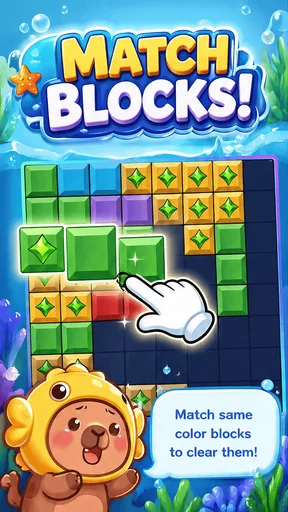
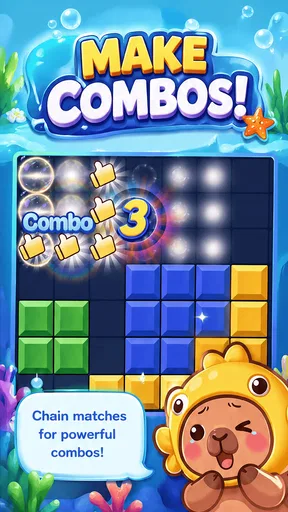
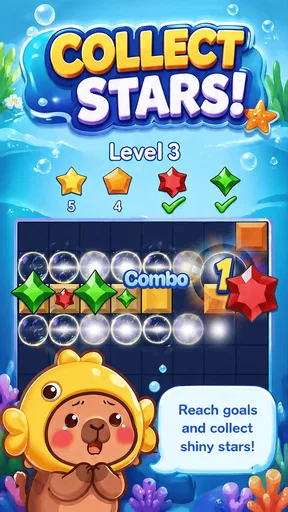
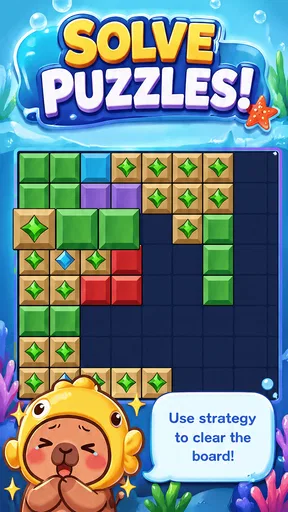
 Analysis by AppCompare
I spent time with Block Puzzle Adventure, a free personalization app from MimoDZ that takes a simple block-placement idea and turns it into a small, easy-to-pick-up puzzle experience. Its central appeal is not a complicated progression system or a large collection of modes. It is the direct satisfaction of arranging pieces, clearing lines, and deciding what to do with limited space before the board becomes difficult to manage.
That focused design makes it a useful choice for short breaks. I could imagine opening it while waiting for an appointment, taking a few turns during a commute, or using it as a quiet way to reset after a busy task. The store summary describes the basic promise clearly, but the practical question is whether that promise remains enjoyable after the first few rounds. In my experience, the answer depends heavily on what you want from a mobile puzzle game.
Why the block-placement idea matters
The most important capability here is the ability to place blocks and clear completed lines. That sounds familiar, but the real effect comes from how quickly each decision becomes meaningful. A piece that fits perfectly now may leave an awkward gap later, while a move that looks less efficient can preserve useful room for the next shape. The game therefore rewards planning without demanding that I learn a complicated rule set first.
I like this kind of design because it gives the player a clear mental task. I am not searching through menus or trying to understand a long tutorial. I am looking at the board, checking the available shapes, and choosing where each one should go. The strongest part of the experience is the balance between immediate action and small-scale strategy. Every placement is easy to understand, but several placements together create consequences.
The app belongs to the personalization category, although its practical use is entertainment rather than phone customization. That classification may feel unusual if you are searching specifically for puzzle games, so I would judge it by its actual play experience instead of expecting wallpaper tools, themes, icons, or other personalization features. It is best understood as a compact block puzzle that happens to be listed in that broader category.
The current version is 1.1, and it supports devices running Android 8.0 or later. That makes it accessible to people using older compatible phones as well as newer models. The age rating is Everyone, which also suits the straightforward nature of the gameplay. I found the concept easy to explain: place the pieces, make lines, and keep the board usable for as long as possible.
What each placement asks you to consider
At first, I naturally wanted to clear a line as soon as possible. That is a reasonable instinct, but it is not always the best move. A nearly complete line can tempt you to fill it immediately, even when doing so blocks a more flexible area of the board. I had better results when I treated open space as a resource rather than focusing only on the next clear.
Worth Reading Before You Choose

EA SPORTS FC Mobile 26 Is a Bigger Football Game, but It Takes Time

Flipboard Shows What News Apps Must Do Beyond the Feed

Switching to Android Auto Means Rethinking Your Driving Routine

Google Calendar Makes a Crowded Week Easier to Manage

Ludo King Makes the Most of the Minutes Between Plans

Baby Panda World Brings Quick Play to Modern Phones, but Its Game Library Feels Busy
This is one of the less obvious lessons in the game. The best position is not necessarily the one that produces the fastest visible result. Sometimes leaving a controlled gap gives you more options, while filling every available space can create a rigid surface that is difficult to recover from. That makes the app more thoughtful than its simple presentation might suggest.
I also found it useful to examine all available pieces before placing the first one. A quick scan helps identify whether one shape has only a single sensible location. Placing that restrictive piece first can prevent an avoidable blockage. More flexible shapes can usually wait because they have several possible homes. This small habit makes the game feel less random and gives each round a clearer rhythm.
A practical routine for short sessions
My preferred way to use the app is to treat a round as a short concentration exercise rather than an endless commitment. I begin by looking for a move that improves the board without closing too many future options. After that, I reassess the empty spaces instead of following the original plan automatically. The board changes after every placement, so a strategy that made sense a moment ago may need to be abandoned.
This approach is particularly helpful when I am playing casually. If I try to rush, I tend to make placements based on the shape in front of me rather than the board as a whole. When I pause briefly and compare the available spaces, I make fewer careless moves. The game does not need a long session to create that small moment of focus.
Another useful habit is to avoid building only along one edge unless the current pieces strongly support it. An uneven board can be valuable because it leaves varied spaces for different shapes, while a long, flat area may look tidy but become difficult to use if the next pieces do not match it. I would not call this a guaranteed formula, but it is a practical way to think about the board when a round starts becoming crowded.
How it feels in everyday use
The app works best when I want an activity that begins immediately and does not require a large time investment. Imagine having ten minutes before a meeting. A story-driven game may not give enough time to reach a satisfying checkpoint, and a competitive multiplayer title may demand more attention than you can spare. A block puzzle fits that gap because one placement can be considered and completed quickly, while a longer session remains possible if the board stays manageable.
That same simplicity can make it suitable for winding down. I can focus on arranging shapes instead of scrolling through several apps, but the task is not so demanding that it feels like work. The best scenario is a quiet, interruption-friendly moment: waiting, taking a break, or looking for something more engaging than passive browsing.
I would be more cautious about using it when I need a strong sense of progression. If you prefer games built around characters, story chapters, competitive rankings, or a large set of unlockable systems, this experience may feel too narrow. Its appeal is the puzzle itself. The game does not need an elaborate wrapper to be enjoyable, but players who rely on those extra layers may find the core loop insufficient.
Where the simple format helps
The limited scope is an advantage for people who dislike learning many systems at once. A new player can understand the objective quickly and start making meaningful decisions almost immediately. That also makes it a reasonable option for families looking for an Everyone-rated puzzle that can be explained without a long set of instructions.
There is also value in the absence of unnecessary pressure during a casual session. I can approach a board at my own pace, think through a placement, and use the game as a brief mental break. For me, that creates a calmer experience than many mobile games that constantly push events, missions, or competitive urgency.
At the same time, simplicity places more responsibility on the core interaction. When a game has only a few central actions, those actions need to remain satisfying. If you already know that traditional block puzzles lose your interest quickly, this app is unlikely to change your mind just because it is easy to start. The straightforward structure is its identity, not merely an introduction before a larger game appears.
Tradeoffs I noticed while playing
The main tradeoff is between accessibility and depth. The rules are approachable, but the same clarity can make the experience feel limited to players who want variety. I enjoyed the process of improving my decisions, yet I would not choose it as my only mobile game. It works better alongside more expansive titles than as a replacement for them.
Another tradeoff concerns attention. The game is easy to understand, but a crowded board still demands concentration. It is not completely mindless, especially when several shapes could fit in more than one place. That is a positive if you want a small strategic challenge, but it may be less suitable when you need something you can play while repeatedly switching attention to other tasks.
I also think the app is better for players who enjoy self-directed improvement than for people who need constant rewards. My satisfaction came from recognizing a poor placement earlier, preserving space longer, or seeing a better arrangement before committing. If your motivation depends mainly on collecting items or reaching a narrative milestone, the basic block loop may not provide enough encouragement.
Because the app is free, it is easy to try without making a purchase decision first. That lowers the barrier for casual players, although free access alone does not guarantee that the format will suit everyone. I would install it for a low-commitment puzzle option, not because I expected a large premium-style campaign or a deep collection of separate activities.
Compared with familiar alternatives
Compared with a classic paper puzzle, the app is more convenient because the board and pieces are always ready on a phone. I do not need to carry anything, draw a grid, or calculate whether a line has been completed. The digital format handles the basic interaction, leaving me to concentrate on placement decisions.
Compared with match-style puzzle apps, this experience feels less dependent on quick reactions and visual combinations. The important question is usually where a block belongs, not how quickly I can spot a chain. That makes it a better fit for players who prefer deliberate planning over rapid tapping.
Compared with large strategy games, it is far easier to enter but offers a much smaller decision space. There are no broad maps, teams, economies, or long-term plans to manage in the core idea. I would choose this app when I want a contained puzzle, while I would choose a larger strategy title when I want a project that develops across many sessions.
That comparison also explains who should skip it. If your favorite mobile games are built around constant novelty, social competition, or dramatic progression, the restrained block-placement format may feel repetitive. If you enjoy gradually refining a familiar skill and appreciate games that respect short sessions, the same restraint becomes a strength.
Who gets the most from this app
I think the best audience is made up of casual puzzle players who want a clear objective and a manageable learning curve. It can also suit someone returning to mobile games after a long break, because the basic interaction is easy to grasp. The Everyone rating supports its broad accessibility, and the Android requirement of 8.0 or newer covers a wide range of compatible devices.
It is especially useful for people who enjoy making small, low-pressure decisions. You do not need to memorize a complicated system to begin improving. Instead, you can focus on recognizing shapes, protecting open space, and learning from the moments when the board becomes difficult. Those lessons are simple, but they give the game more substance than a purely automatic time-killer.
I would also recommend it to anyone who wants a puzzle that can fit around an unpredictable schedule. If a phone call or task interrupts you, the short-turn structure is more practical than a game that expects uninterrupted attention for a long chapter. Still, I would avoid opening it during situations where even a brief lapse in attention could cause trouble. The board may be simple, but careless moves can end a promising round.
For younger players, the clear rules and Everyone rating make the concept approachable, while adults may appreciate it as a quiet break. The important expectation is that this is a focused puzzle app, not a broad entertainment package. Knowing that before installing it will make the experience feel more satisfying.
What I would do before deciding
I would first ask myself whether I enjoy block-placement puzzles in general. If the answer is yes, the free price makes trying this version straightforward. I would then check that my phone runs Android 8.0 or later and leave enough attention for a game where each placement can affect the rest of the board.
I would not choose it if I were specifically looking for phone personalization tools, despite its category. I would also look elsewhere if I wanted a story campaign, online competition, or a broad set of puzzle types. Those are not minor preferences; they change the kind of experience I am seeking.
The app has reached over ten thousand installs and holds a 4.3 average from 62 ratings, with 13 written reviews. Those figures suggest that it has found an audience, but I would treat them as context rather than a substitute for matching the game to my own taste. A highly rated simple puzzle can still feel too repetitive to someone who wants constant new mechanics.
My overall impression after using it
Block Puzzle Adventure succeeds because it keeps its main idea visible. I place pieces, protect useful space, and clear lines when the arrangement is right. The experience is most enjoyable when I slow down enough to think one or two moves ahead without turning a short break into a serious study session.
Its weaknesses come from the same source as its strengths. The focused format is welcoming, but it may not satisfy players who need extensive content or a strong progression system. I would recommend it as a compact puzzle companion rather than a complete replacement for every other game on a phone.
MimoDZ has made something approachable for people who want a free, Everyone-rated way to spend a few spare minutes. My practical advice is to judge it by the quality of its central decision-making: if choosing where each block belongs sounds satisfying, this is worth trying. If you need a story, social competition, or constant mechanical change, another kind of game will serve you better.
For my own use, the app works best as a calm reset between tasks. I can open it, make a few careful placements, and leave with the feeling that I used my attention rather than simply filling time. That small, focused loop is the reason I would recommend it to a friend who enjoys thoughtful puzzles without unnecessary complexity.
Pros
- Simple drag-and-drop controls are easy for beginners to learn.
- Colorful visuals make the puzzle board pleasant to use.
- Short levels fit well into quick gaming sessions.
- Offline play is convenient when no internet connection is available.
- Increasing challenges can keep casual players engaged over time.
Cons
- Ads may interrupt gameplay
- especially between completed levels.
- Some stages can feel repetitive after extended play.
- Limited strategic depth may disappoint experienced puzzle fans.
- Progression may rely heavily on completing similar puzzle patterns.
- A small screen can make precise block placement uncomfortable.
FAQs for Block Puzzle Adventure
What is Block Puzzle Adventure and how is it played?
Block Puzzle Adventure is a casual puzzle game built around placing differently shaped blocks on a board to complete rows, columns, or other objectives. After downloading it, players generally drag pieces into available spaces, clear completed lines, and try to achieve the highest score possible. Its simple controls make it easy to start, while limited space and increasingly demanding stages add a strategic challenge.
Is Block Puzzle Adventure free to download and play?
Block Puzzle Adventure can typically be downloaded and played without an upfront purchase, making it accessible to most Android and iOS users. However, the free version may include advertising, optional in-app purchases, or paid items such as boosters, extra attempts, or other conveniences. Before confirming a purchase, check the store listing and your device’s payment settings for the latest pricing information.
Does Block Puzzle Adventure require an internet connection?
Many of the core block-placement levels in Block Puzzle Adventure may be playable offline, which is useful when traveling or when a stable connection is unavailable. Nevertheless, certain features can depend on the internet, including advertisements, cloud synchronization, leaderboards, events, updates, and in-app purchases. Availability may also vary by version, so test the game offline after installation rather than assuming every mode will work.
Is Block Puzzle Adventure suitable for children and beginners?
Block Puzzle Adventure is generally easy for beginners because its main mechanic relies on familiar drag-and-drop controls rather than complicated rules. It can also be suitable for children, although parents should review the game’s advertising, purchase options, and privacy information before allowing independent play. Difficulty, time pressure, or recurring prompts may affect younger players differently, so parental supervision is recommended for a more controlled experience.
What should I check before downloading Block Puzzle Adventure?
Before downloading Block Puzzle Adventure, check that your Android or iOS device meets the required operating-system version and has enough free storage for the installation and future updates. It is also worth reviewing recent user feedback, the developer’s privacy policy, permissions, advertising approach, and in-app purchase details. Confirm that the download comes from the official app store to reduce the risk of installing an altered or unsafe copy.


